Overview
The engineering problem
A page's initial HTML may omit content added by JavaScript. Extracting an article can also lose useful structure or capture surrounding navigation. Fetching user-supplied URLs introduces network access that needs explicit limits.
Contribution
I built the Chromium conversion pipeline, URL and network checks, local web interface, Markdown editor and preview, and CLI. I added automated fixtures for conversion, security boundaries, document editing, and export behaviour.
What exists now
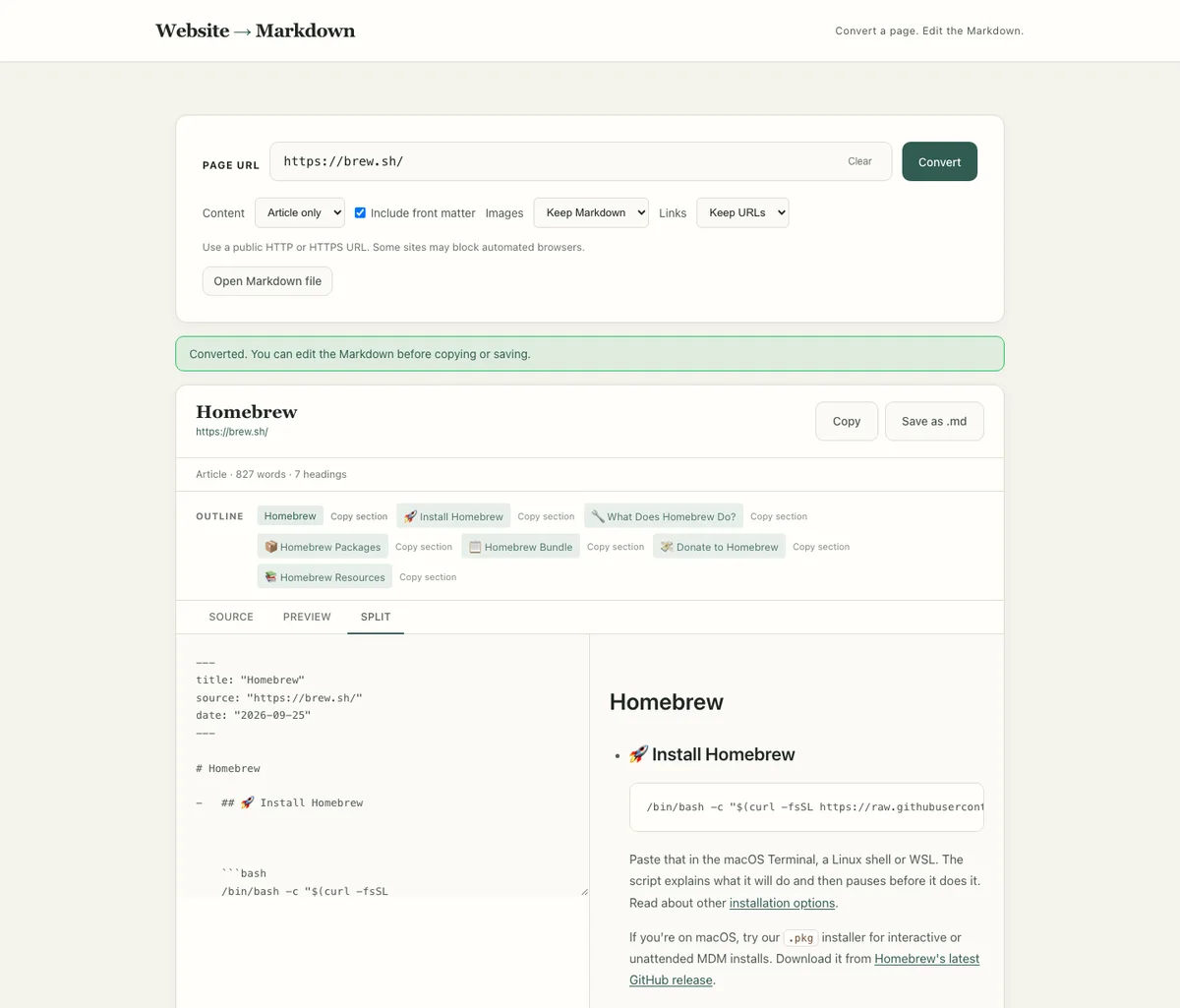
The repository provides a local web app and CLI for converting a page into Markdown. The web app supports editing, a sanitized preview, an outline that follows edits, copying, and saving the resulting document.
- Source fixtures cover conversion, URL handling, document structure, preview, CLI, and API behaviour.View conversion and security tests (opens in a new tab)
- Tests exercise the editor, outline, preview, and export controls using local fixtures.View chromium interface tests (opens in a new tab)
- The workflow checks lint, formatting, tests, and dependency audit on Node.js 22, 24, and 26.View ci definition (opens in a new tab)
Engineering detail
Constraints
- The application runs locally with Node.js and Playwright Chromium. The server listens on 127.0.0.1 and the project has no hosted service.
- Conversion processes one public HTTP or HTTPS page per request. It does not sign in, crawl a site, or interact with consent banners.
- Network rendering must have bounded time, requests, and content sizes. Those bounds can leave a page incomplete.
Architecture at a glance
The web interface sends URL conversions to an Express endpoint. The CLI uses the same conversion function. A Node fetch layer validates and pins public addresses before supplying responses to Chromium. The rendered HTML passes through Readability and Turndown. In the browser, editable Markdown feeds a Marked preview sanitized with DOMPurify.
Key decisions
When is a page ready to convert?
Fetching HTML alone misses JavaScript content, while waiting for network silence can stall on continuously active pages.
- Selected
- Render through Chromium, then watch for substantive body text to settle within a bounded wait before extracting HTML.
- Alternatives
- Convert the initial HTTP response without running JavaScript; Wait for all network activity to stop
- Trade-off
- Late content, blocked resources, and pages with little stable text may still be incomplete.
- Consequence
- JavaScript-rendered fixtures can be converted without requiring a quiet network.
What should happen when article extraction is uncertain?
Readability does not identify a useful article on every page.
- Selected
- Use article content when it contains enough paragraph text. Otherwise convert the body and return a visible warning. Also offer explicit Full page conversion.
- Alternatives
- Fail when article extraction finds no article; Always convert the complete body
- Trade-off
- The body fallback may include navigation and repeated page furniture.
- Consequence
- The user can inspect and edit the result rather than silently receiving an assumed clean article.
How should browser rendering access the network?
A public-looking URL can resolve or redirect to a nonpublic address, and pages can request additional resources.
- Selected
- Validate HTTP and HTTPS URLs, standard ports, and every DNS answer. Pin the selected public address for each Node request and recheck redirects and allowed browser subresources through the same fetch layer.
- Alternatives
- Validate only the first URL and let Chromium fetch subsequent resources directly
- Trade-off
- Blocking media, workers, WebSockets, and other browser features reduces compatibility. These checks do not establish universal safety against hostile pages.
- Consequence
- Network access has an inspectable boundary with shared request, byte, and time budgets.
How can editing and preview stay useful without loading remote content?
Converted or opened Markdown can contain active HTML and remote images. Export needs to reflect the current edits.
- Selected
- Keep the editable document in the browser, sanitize the rendered preview with DOMPurify, and represent remote images as text placeholders. Copy and Save as .md use the edited text.
- Alternatives
- Render raw HTML directly or preview remote images automatically
- Trade-off
- The preview is intentionally less visually complete than the source page.
- Consequence
- Source, Preview, and desktop Split views support review without the preview fetching remote images.
Reliability and quality
- Automated tests
- The test suite covers URL and mixed-DNS rejection, redirects, pinned lookup, conversion fixtures, API validation, CLI arguments and overwrite protection, preview sanitization, heading analysis, and Chromium UI interactions.
- Rendering and editing fixtures
- Browser tests exercise JavaScript content with ongoing network activity, failed content resources, editing, outline actions, preview, and save controls. Deterministic fixtures do not establish compatibility with arbitrary live websites.
- CI definition
- The workflow defines lint, formatting, automated tests, and a dependency audit on Node.js 22, 24, and 26. Live-site conversion is excluded from CI. A manual smoke script targets Homebrew separately.
Limits that shape conversion
The fetch layer (opens in a new tab) budgets 30 seconds, 80 requests, 2 MB per response, 12 MB of downloads, and at most five redirects per fetch. The converter also limits rendered HTML to 4 MB and Markdown output to 2 MB. The local server admits two active conversions. These are configured bounds, not measured performance results.
The converter (opens in a new tab) routes allowed document, script, and data requests through the checked fetch layer. It blocks image, media, font, WebSocket, and event-stream requests, disables workers, and warns when content requests fail. The settling check waits for repeated substantive text within a cap, so a page can still change after capture.
Two interfaces, one conversion path
The web app offers article and full-page modes, optional front matter, and choices for images and link destinations. Local Markdown files are read in the browser, with a 2 MB limit and a prompt before replacing unsaved edits. The preview implementation (opens in a new tab) keeps remote images as placeholders.
The CLI (opens in a new tab) writes Markdown to stdout or a selected file, refuses to overwrite an existing file, and reports failures through stderr and a nonzero exit code. Both interfaces reuse the conversion function, so rendering and extraction decisions stay in one place.
What next
Live-page compatibility and operational isolation would need separate evidence before offering this as a public service. The local workflow keeps the current deployment scope explicit.
Limitations
- This is a local application, not a hosted conversion service. Chromium must be installed and the machine needs access to the public target website.
- Article extraction is heuristic. Body fallback may include navigation, while delayed content, blocked scripts, browser restrictions, and site bot controls can prevent a complete conversion.
- The fetch layer reduces access to nonpublic destinations but is not a complete security guarantee for running untrusted browser code. Public deployment would need a separate isolation and operational review.
- Tests use controlled fixtures and substituted dependencies. They do not prove universal website compatibility or security against every hostile input.
- Preview sanitization applies to the local preview. Exported Markdown should still be treated as untrusted content by whichever application opens it.