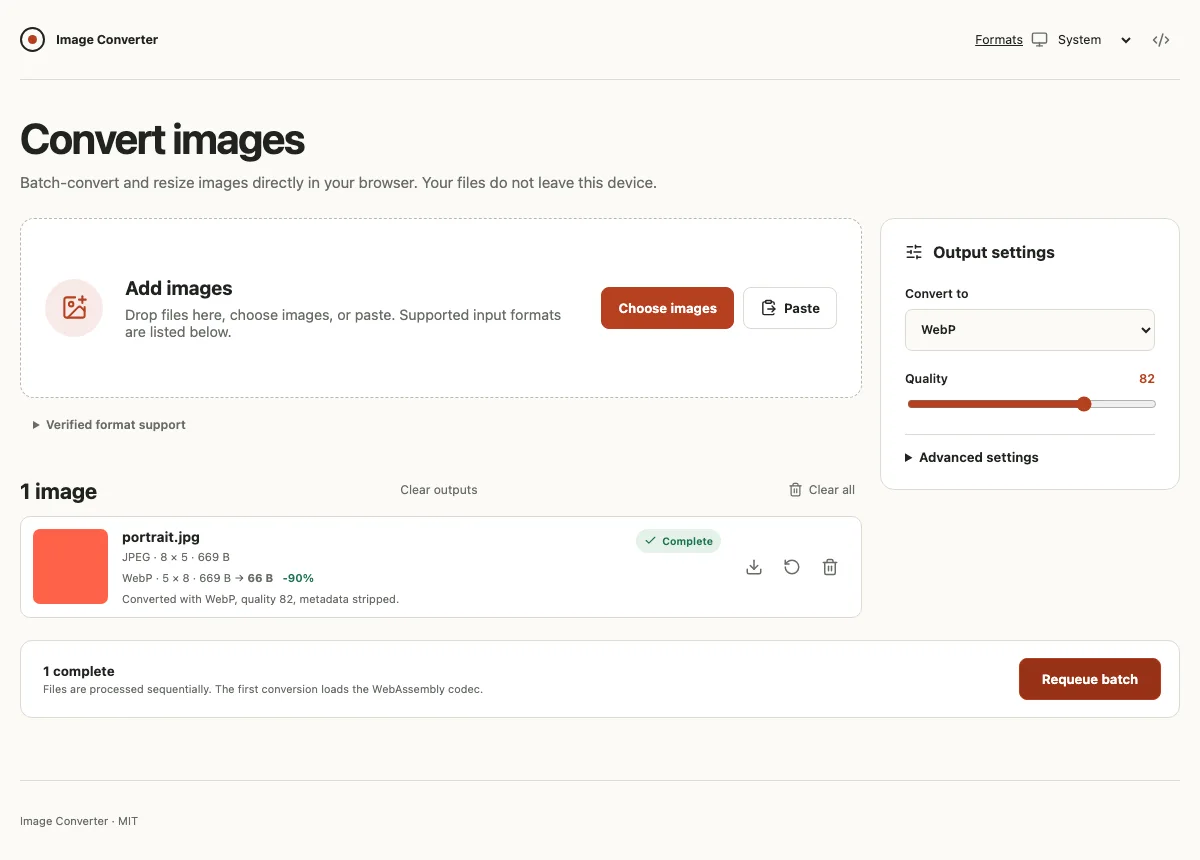
Overview
The engineering problem
Image conversion must decode large, sometimes malformed files while the interface keeps accepting input, explaining failures, and offering usable downloads. In a browser, the same device supplies the codec memory, queue storage, and responsive UI.
Contribution
I combined a React queue, content-based format detection, worker-hosted ImageMagick WebAssembly, bounded batch processing, accessible controls, and a static Vercel release.
What exists now
Image Converter has a public v1.0.0 release and a live Vercel deployment. Its source and automated checks show the codec, worker, accessibility, and resource decisions behind a shipped browser product.
- Application, component, queue, validation, worker-client, and ZIP test files in the public source.View unit and component tests (opens in a new tab)
- Tests use the distributed WASM to check actual encoding, HEIC input, orientation, transparency, and invalid data.View codec integration (opens in a new tab)
- Playwright conversion, download, ZIP, invalid input, keyboard, theme, and accessibility scenarios.View browser scenarios (opens in a new tab)
- Playwright config includes desktop and mobile Chromium, Firefox, and WebKit. Scenarios run axe in several UI states.View browser matrix (opens in a new tab)
- Source of the automated formatting, lint, type, test, build, size, and browser gates.View ci workflow (opens in a new tab)
- Published release notes document the supported formats, browser limits, deployment, and known limitations.View v1.0.0 release (opens in a new tab)
- Hosted browser app for local image conversion.View live product (opens in a new tab)
- The diagram traces the main thread, codec worker, and ZIP worker boundaries.
Engineering detail
Constraints
- Image bytes stay in the browser. The Vite app has no upload API, account, database, or server processing path.
- Source files, decoded pixels, retained outputs, and ZIP assembly compete for browser memory.
- The advertised format matrix must reflect what the distributed codec actually reads and writes.
- Keyboard access, clear error feedback, narrow layouts, and browser differences remain part of the product.
Architecture at a glance
Picker, drop, and paste feed content sniffing and a React queue on the main thread. The queue sends transferable bytes to a conversion worker, which loads ImageMagick WebAssembly on first inspection. Completed Blobs return to the application for individual download or pass to a separate, on-demand ZIP worker. There is no file upload path.
File input passes through content-based validation into React queue state. A conversion worker uses the lazily loaded ImageMagick WebAssembly codec and returns output to the interface. Completed output can download directly or be assembled by a separate ZIP worker. All stages run on the user's device.
- File input: The picker, drop zone, and clipboard paste provide local File objects.
- Validation: Content signatures identify inputs. File, batch, dimension, and settings limits are checked before conversion and again at the worker boundary.
- UI and queue: React owns files, settings, job status, progress, completed Blobs, and object URL cleanup.
- Download: The interface creates individual downloads and receives a finished ZIP for batch download.
- Codec worker: A module worker inspects and converts one job at a time. Cancellation terminates and recreates it.
- WASM codec: ImageMagick WebAssembly decodes, transforms, and encodes the supported format matrix after lazy loading.
- ZIP worker: A separate worker starts on demand and packages eligible completed Blobs with ZIP STORE.
Connections: File input to Validation (local files); Validation to UI and queue (accepted jobs); UI and queue to Codec worker (inspect and convert); Codec worker to WASM codec (decode and encode); Codec worker to UI and queue (progress and output bytes); UI and queue to ZIP worker (completed Blobs); UI and queue to Download (individual files); ZIP worker to Download (archive).
Boundaries: Main thread; Worker threads.
Annotations: Browser only. No upload path.
Key decisions
Where should image processing happen?
Uploading source images would add a server and transfer private files before conversion could begin.
- Selected
- Keep source Files, conversion, and completed Blobs in the browser. The deployed Vite application is static and has no upload API.
- Alternatives
- Upload files to a server-side conversion service
- Trade-off
- The user's device supplies CPU and memory, so large or difficult files may fail even within configured limits.
- Consequence
- The product can offer conversion without an account or server processing, while making browser resource constraints explicit.
Which codec should support the advertised format matrix?
Native browser encoders do not provide the complete input and output matrix, including HEIC input and TIFF and ICO output.
- Selected
- Put @imagemagick/magick-wasm behind a module worker and load its hashed WASM asset when inspection first needs it. Advertise only formats verified against the distributed codec.
- Alternatives
- Combine smaller format-specific @jsquash codecs and additional decoders; Add a separate HEIC decoder
- Trade-off
- The broad codec brings a large initial download and WebAssembly memory cost.
- Consequence
- One adapter handles orientation, resize, alpha flattening, metadata stripping, and encoding across the verified formats. The codec integration test checks output signatures and HEIC input.
How should expensive conversion and archive work interact with the interface?
Inspection, encoding, and ZIP creation can take long enough to interfere with controls and progress feedback on the main thread.
- Selected
- Transfer image bytes to a codec worker for inspection and sequential conversion. Start a separate ZIP worker only when a batch archive is requested. Terminate and recreate the codec worker on cancellation.
- Alternatives
- Run codec and ZIP work on the main UI thread; Keep an archive worker running throughout the session
- Trade-off
- Worker protocols, transferable buffers, cancellation, and cleanup add coordination code. ZIP assembly temporarily duplicates output data.
- Consequence
- React can continue reporting job state and errors while workers perform heavy work, and archive creation is limited to eligible completed outputs.
What limits keep a browser batch practical?
Compressed images can expand sharply in memory, and retaining originals, previews, outputs, WASM state, and an archive compounds usage.
- Selected
- Cap the queue at 30 files, each source at 50 MiB, decoded and output images at 40 megapixels, output axes at 8192 px, retained sources and outputs at 150 MiB each, and ZIP inputs at 75 MiB. Convert sequentially and revoke unused object URLs.
- Alternatives
- Accept unbounded batches and dimensions; Convert queued files concurrently
- Trade-off
- Some legitimate large batches require smaller groups or individual downloads, and the caps cannot guarantee success on every device.
- Consequence
- The interface can reject known unsafe requests early, while the worker and codec adapter check their own boundaries before encoding.
Reliability and quality
- Unit and component checks
- Vitest covers queue and file utilities, detection, resize and validation rules, worker clients, ZIP rules, React components, and application states including errors and reconversion.
- Codec integration
- The distributed ImageMagick WASM is exercised against advertised encoders, file signatures and dimensions, HEIC decoding, EXIF orientation, transparency fill, corrupted input, and unsafe resize requests.
- Browser and accessibility checks
- Playwright tests the production build in desktop and mobile Chromium, Firefox, and WebKit. Scenarios include conversion and download, ZIP naming, keyboard order, invalid input, narrow reflow, themes, and axe checks at several states.
- Delivery gates
- GitHub Actions runs format, lint, type, Vitest, build, bundle-size, and multi-browser Playwright checks on pushes to main and pull requests. Vercel serves the static build with configured security headers.
Trace the implementation
- Application queue (opens in a new tab), format detection (opens in a new tab), and resource validation (opens in a new tab) show how files enter, run, and leave the interface.
- Codec worker (opens in a new tab), ImageMagick adapter (opens in a new tab), and the codec decision record (opens in a new tab) explain the lazy WASM boundary and verified format choices.
- ZIP worker (opens in a new tab) and architecture notes (opens in a new tab) explain on-demand archives, cancellation, and memory limits.
What next
The next useful evidence would be measured conversion and memory behaviour across representative devices. The published roadmap treats offline support and any server processing as separate future work.
Limitations
- Browser memory remains device dependent. Compressed images and the WASM runtime can exhaust a tab despite the 30-file, byte, dimension, and ZIP guardrails.
- The first inspection fetches a large, lazily loaded WASM asset. AVIF encoding can be slow, and offline use is unsupported.
- Animation and multipage content is reduced to the first frame or page. SVG input, animated output, and multipage preservation are unsupported. HEIC/HEIF is input only and ICO is output only.
- Output metadata and colour profiles can change across formats. The app does not offer source previews for TIFF or HEIC, and clipboard read access requires permission.